Imagine pressing a button and watching a physical object materialize before your eyes - a custom phone stand, a replacement gear for your blender, a personalized gift for a friend, or even a prosthetic hand for someone in need. That's not science fiction anymore. That's a 3D printer at work.
Over the past decade, 3D printing has transformed from an expensive industrial novelty into an accessible, everyday technology. Students use it in classrooms. Doctors use it in hospitals. Architects use it to visualize buildings before a single brick is laid. Entrepreneurs use it to prototype new products without expensive factory tooling.
In this comprehensive guide, we'll cover everything you need to know about 3D printers - what they are, how they work, the different types available, what materials they use, where they're being used across industries, and how to choose the right one for your needs.
Definition of 3D Printer
A 3D printer is a machine that turns a digital design file into a real, physical, three-dimensional object by building it up layer by layer, like stacking hundreds of paper-thin sheets on top of each other until a solid object forms.
This process is called additive manufacturing because material is added to build the object, rather than cutting or drilling it away from a block (which is called subtractive manufacturing).
Here's the basic workflow:
- Create or download a 3D design file (STL, OBJ, or 3MF format)
- Process it through slicer software - this breaks the model into layers and generates movement instructions for the printer
- Send to the printer - the machine follows the instructions and deposits material layer by layer
- Collect your object - often within a few hours
The end result is a physical object that precisely matches the digital design. It could be a phone holder, a prototype gear, a custom phone case, a medical model, an architectural scale model, or almost anything else you can imagine.
A Quick History of 3D Printing
3D printing was invented in the early 1980s in the United States. For decades, it was strictly an industrial tool used by companies like Boeing and BMW machines that cost hundreds of thousands of dollars and required trained operators.
The turning point came in the mid-2000s with the open-source RepRap project, which sought to create a self-replicating printer that anyone could build at home. This democratized the technology. By the 2010s, consumer-grade printers began arriving at prices regular people could afford.
Today, the global 3D printing industry is worth approximately $20 billion (USD), growing at roughly 20% per year. In Bangladesh, demand has been accelerating driven by university engineering departments, startup founders in tech hubs, and the fast-growing e-commerce economy on different Marketplaces.
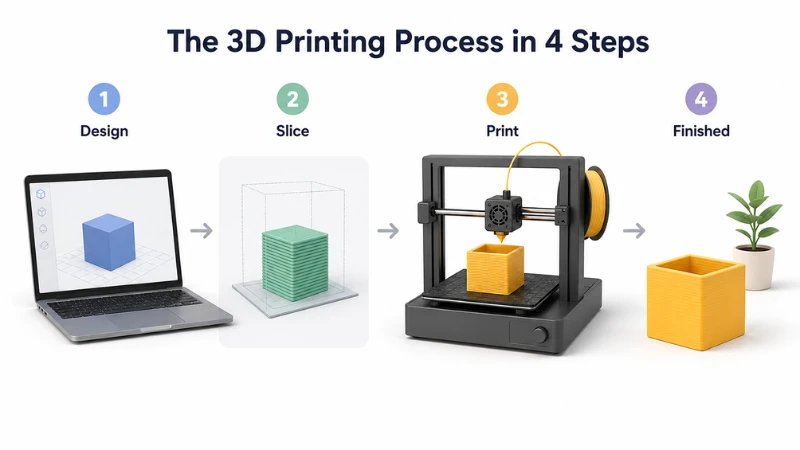
How Does a 3D Printer Work?
You don't need an engineering degree to understand this. Here's what happens inside a 3D printer:
Step 1: Design or Download Your Model
Use free design software like Tinkercad (browser-based, no installation needed) to design a 3D model, or download a ready-made file from sites like Thingiverse, Printables, or Cults3D most files are free.
Step 2: Slice the Model
Import the file into slicer software (Ultimaker Cura is the most popular, and it's free). The slicer mathematically slices your 3D model into hundreds or thousands of thin layers and generates a G-code file essentially a movement script for the printer.
Step 3: Print It
Load the G-code onto the printer via SD card, USB, or Wi-Fi. The printer heats its nozzle to the required temperature and starts depositing material tracing each layer precisely, one on top of another, until the object is complete.
Step 4: Finishing
Remove the object from the print bed. Depending on the complexity, you may need to remove support structures, sand rough edges, or apply paint. For resin printing, there's a washing and UV-curing step.
That's it. The entire process from laptop to finished object can take as little as 30 minutes for small prints, or up to 30+ hours for large and complex models.
Types of 3D Printers
3D printers are different based on how they build objects layer by layer and what material they use. Some are cheap and beginner-friendly, while others are advanced and used in industries like medicine and manufacturing.
1. FDM (Fused Deposition Modeling)
FDM printers are the most common and beginner-friendly type. They work by melting a plastic filament (like PLA or ABS) and placing it layer by layer to build an object.
They are widely used because they are cheap, easy to use, and easy to repair. In Bangladesh, they are the most popular choice for students, hobbyists, and small startups because both machines and materials are easily available and affordable.
Key Features
- Low cost and widely available
- Easy to use and maintain
- Large community support
- Most common type in Bangladesh
2. SLA (Stereolithography)
SLA printers use a UV laser to harden liquid resin very precisely. This produces extremely smooth and highly detailed prints compared to FDM.
However, resin is more expensive and requires careful handling and storage, especially in hot and humid climates like Bangladesh.
Key Features
- Extremely high detail and accuracy
- Smooth surface finish
- Professional-grade results
3. MSLA (LCD Resin Printing)
MSLA is a cheaper and faster version of SLA. Instead of a laser, it uses an LCD screen with UV light to cure resin layer by layer.
It gives high-quality detail at a lower cost, making it very popular among designers and hobbyists who want fine detail without expensive machines.
Key Features
- High detail like SLA
- Faster printing speed
- More affordable than SLA
4. DLP (Digital Light Processing)
DLP works similarly to SLA but uses a projector to cure an entire layer at once, making it faster.
It is commonly used in professional environments where both speed and detail matter, such as dental labs and medical modeling.
Key Features
- Faster than SLA
- High accuracy and detail
- Efficient layer curing
5. SLS (Selective Laser Sintering)
SLS uses a powerful laser to fuse powdered material (usually nylon) into solid parts. Unlike other types, it does not need support structures, allowing complex designs.
It is strong, durable, and widely used in industries, but very expensive for normal users.
Key Features
- No support structures required
- Very strong and durable parts
- Suitable for complex geometries
6. MJF (Multi Jet Fusion)
MJF is an advanced industrial printing method developed by HP. It uses powder and special agents to quickly build strong and precise parts. It is very fast and ideal for large-scale production.
Key Features
- Very fast printing
- Strong and consistent parts
- High production efficiency
7. Binder Jetting
Binder Jetting uses a liquid binder to glue powder layer by layer. It can create metal, ceramic, or sand-based objects.
It is used mainly in large industrial applications like architecture and metal casting.
Key Features
- Can use metal, sand, or ceramics
- Suitable for large objects
- Cost-effective for industrial production
3D Printer Technology Comparison
|
Type |
Material |
Speed |
Detail Quality |
Best Use Case |
Price Range (BDT) |
|
FDM |
Plastic filament |
Medium |
Medium |
Students, hobby, prototyping |
৳15,000 – ৳80,000 |
|
SLA |
Resin |
Slow |
Very High |
Jewelry, dental, detailed models |
৳25,000 – ৳1,50,000 |
|
MSLA |
Resin |
Medium-Fast |
High |
Miniatures, design work |
৳20,000 – ৳80,000 |
|
DLP |
Resin |
Fast |
Very High |
Medical, dental, professional use |
৳20,000 – ৳1,20,000 |
|
SLS |
Powder (nylon) |
Medium |
High |
Industrial mechanical parts |
৳5,00,000+ |
|
MJF |
Powder |
Very Fast |
High |
Mass production industry |
৳6,00,000 – ৳20,00,000+ |
|
Binder Jetting |
Powder (metal/sand) |
Medium |
Medium-High |
Architecture, metal casting |
৳10,00,000+ |
3D Printing Materials
The material you choose dramatically affects the strength, flexibility, appearance, and durability of your printed object. Here's a guide to the most common materials.
FDM Filaments
PLA (Polylactic Acid)
- Print temp: 180-220°C
- Strength: Medium
- Flexibility: Low (brittle)
- Special traits: Biodegradable, made from corn starch, low warping, easy to print
- Best for: Display models, decorations, prototypes, educational projects
- Note: Not suitable for high-heat environments (warps above ~60°C)
ABS (Acrylonitrile Butadiene Styrene)
- Print temp: 220-250°C
- Strength: High
- Flexibility: Medium
- Special traits: Heat-resistant, durable, machinable
- Best for: Automotive parts, housings, functional components
- Warning: Emits fumes during printing - always use in a well-ventilated space or enclosure
PETG (Polyethylene Terephthalate Glycol)
- Print temp: 220–245°C
- Strength: High
- Flexibility: Medium
- Special traits: Chemical resistant, semi-transparent, food-safe (if properly printed)
- Best for: Bottles, food containers, outdoor use, mechanical parts
TPU (Thermoplastic Polyurethane)
- Print temp: 220–235°C
- Strength: Medium
- Flexibility: Extremely high (rubber-like)
- Special traits: Shock-absorbing, elastic
- Best for: Phone cases, gaskets, shoe insoles, toys, grip covers
Nylon
- Print temp: 240–260°C
- Strength: Very high
- Flexibility: Medium
- Special traits: Abrasion-resistant, lightweight, strong
- Best for: Gears, bearings, industrial parts, functional prototypes
- Note: Highly moisture-sensitive - must be stored and printed dry
Carbon Fiber PLA / PETG
- Print temp: 200–230°C
- Strength: Extremely high
- Special traits: Very lightweight, stiff, premium look
- Best for: Drone parts, racing components, structural brackets
Wood PLA
- Print temp: 190-220°C
- Special traits: Contains wood fibers - looks and smells like real wood
- Best for: Decorations, sculptures, gift items, architectural models
Proper Filament Storage: Don't Ignore This
Filament - especially Nylon, TPU, and PVA - absorbs moisture from the air and degrades in quality. Wet filament causes:
- Bubbling and popping during extrusion
- Poor layer adhesion
- Stringy, rough surface finishes
- Brittle prints
Storage best practices:
- Keep filament in airtight containers or dedicated dry boxes
- Use silica gel packets to absorb residual moisture
- Store away from direct sunlight (UV degrades PLA)
- Use a filament dryer before printing if the spool has been exposed to air
- Nylon and TPU need the most attention - store these immediately after use
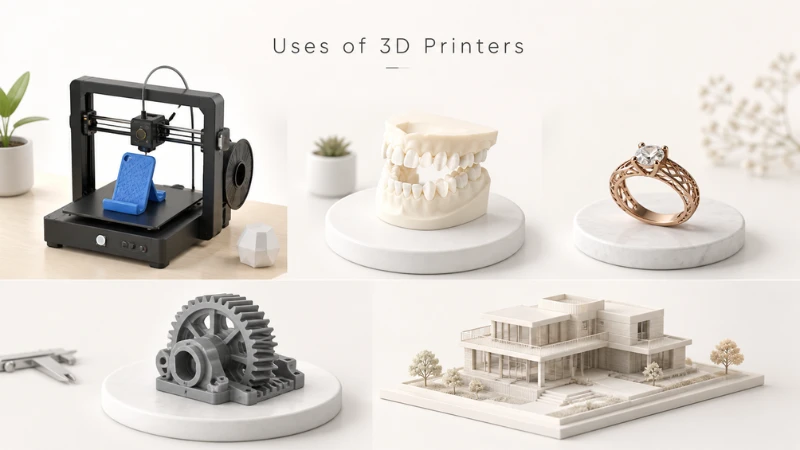
Uses of 3D Printers
3D printing is no longer a novelty, it's a critical tool across dozens of industries. Here's how it's being applied in the real world today.
Universities and Educational Institutions
BUET, CUET, RUET, DUET, and many private universities now have 3D printers in their engineering labs. Students use them to build robotics competition parts, architectural models, final year project prototypes, and research models. If your university has a maker lab, this is the best place to start experimenting before buying your own printer.
Garments and Textile Industry
Bangladesh's RMG sector the backbone of our economy is beginning to explore 3D printing for:
- Prototyping new button, zipper, and fastener designs without expensive tooling
- Creating custom fit mannequins and measurement tools
- Producing jigs and fixtures for factory floor processes
- Sampling new packaging concepts for export clients
This is an area with enormous potential that remains largely untapped.
Healthcare and Medical
Private hospitals and dental clinics in Dhaka, especially in Gulshan and Banani, are increasingly using MSLA and DLP printers to produce:
- Dental surgical guides and study models
- Orthopedic pre-surgical planning models
- Custom orthotics and support devices
Some NGOs are exploring low-cost 3D-printed prosthetics for rural communities, a genuinely life-changing application for Bangladesh.
Architecture and Real Estate
Dhaka's booming real estate sector has architects printing scale building models for client presentations. What previously required weeks of handcrafting by a model maker can now be produced overnight.
Startups and E-Commerce Entrepreneurs
This is perhaps the most exciting local opportunity. Bangladeshi entrepreneurs are using 3D printers to:
- Produce and sell custom phone accessories
- Create personalized gifts (name plates, custom figurines, keychains)
- Manufacture small-batch product prototypes
- Offer print-on-demand services to businesses
- Create unique home decor items
The startup cost is low. The market is hungry. And 3D printing gives micro-entrepreneurs the ability to produce without a factory.
Fashion, Jewelry, and Consumer Products
- High-fashion designers like Iris van Herpen create entire runway garments using 3D printing
- Jewelers use SLA and DLP printers to produce wax or resin models for lost-wax casting
- Custom accessories, personalized gifts, and niche consumer products are thriving in the 3D printing marketplace
Repair and Replacement Parts
One of the most practical uses in Bangladesh: printing replacement parts for broken appliances, vehicles, and machinery. Can't find a specific knob or bracket locally? Design it in Tinkercad and print it yourself. This saves time, money, and avoids dependence on imported spare parts.
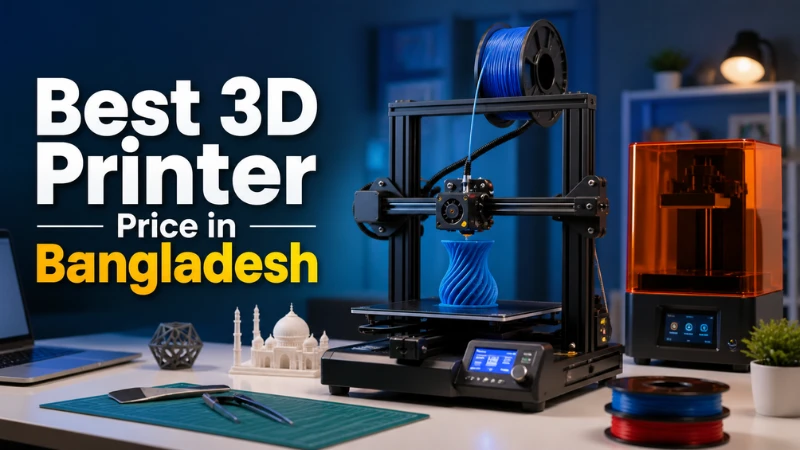
Best 3D Printer Price in Bangladesh
3D printing technology has become increasingly popular in Bangladesh among students, professional engineers, architects, and creative makers. From high-speed industrial machines to budget-friendly desktop models, there is now a wide range of options available. Below, we highlight the top 8 3D printer models across various categories to help you choose the best option for your budget and needs.
1. Bambu Lab H2C Laser Full Combo 40W
The Bambu Lab H2C is an advanced industrial-grade FDM printer that uniquely combines dual-nozzle 3D printing with a powerful 40W laser module. It is the ultimate choice for professional R&D labs and engineering workshops in Bangladesh.
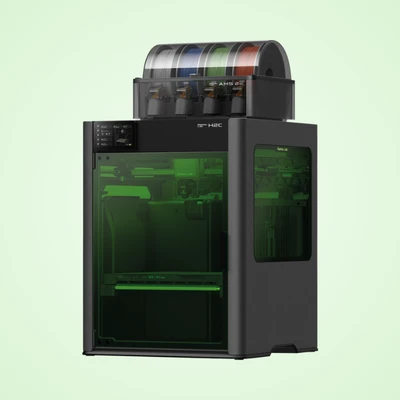
Features & Specifications
|
Feature |
Details |
|
Technology |
FDM (Dual Nozzle) + 40W Laser |
|
Build Volume |
330 × 320 × 325 mm |
|
Max Nozzle Temp |
350°C (Supports engineering filaments) |
|
Special Features |
AI Filament Monitoring, Active Heated Chamber (65°C) |
|
Material Support |
PLA, PETG, ABS, Carbon Fiber, Wood/Acrylic (Laser) |
Description:
Built on a rigid aluminum chassis, the H2C offers zero-waste multi-material printing. Its closed-loop servo extruder ensures pinpoint accuracy, while the integrated 40W laser allows for high-precision cutting and engraving on materials like wood and acrylic. It is cybersecurity compliant, making it a safe choice for institutional and enterprise environments.
Price: Approx. ৳6,30,000 - ৳6,80,000.
2. Bambu Lab X1C (Carbon) Combo with Multi-color AMS
The Bambu Lab X1 Carbon Combo is a next-generation high-speed 3D printer designed for professional creators and engineers who demand precision. Equipped with the Automatic Material System (AMS), it allows for seamless multi-color and multi-material printing.
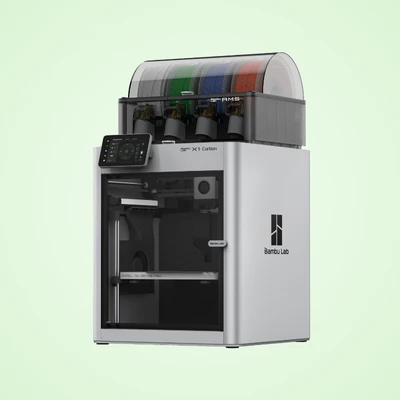
Features & Specifications
|
Feature |
Details |
|
Technology |
Fused Deposition Modeling (FDM) |
|
Build Volume |
256 × 256 × 256 mm |
|
Max Speed |
500 mm/s |
|
Acceleration |
20,000 mm/s² |
|
Max Hotend Temp |
300 ℃ |
|
AI Features |
Lidar Sensor & 1080p AI Camera |
|
Chassis |
Steel with Aluminum & Glass Shell |
Description:
The X1-Carbon is a fully enclosed powerhouse featuring AI-assisted monitoring. Its Lidar sensor and AI camera provide auto-bed leveling, first-layer inspection, and real-time error detection. The hardened steel nozzle and 300°C hotend make it ideal for printing advanced engineering materials like Carbon Fiber, PA, and PC. With the included AMS, you can print in up to 4 colors simultaneously with minimal effort.
Price: Approx. ৳2,19,360 - ৳2,85,170.
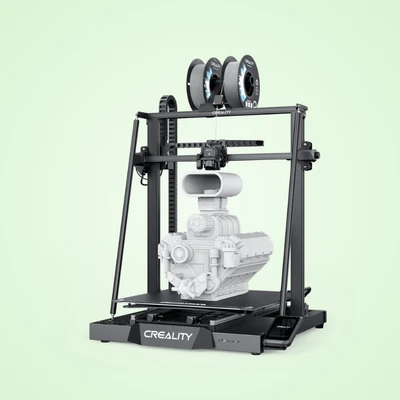
3. Creality CR-M4 3D Printer
The CR-M4 is a quasi-industrial grade large-format 3D printer, perfect for those needing to print massive models or start a 3D print farm. Its massive build volume and rigid construction ensure reliable large-scale production.
Features & Specifications
|
Feature |
Details |
|
Build Volume |
450 x 450 x 470 mm |
|
Extruder |
"Sprite" Dual-gear Direct Drive |
|
Auto-Leveling |
25-point CR Touch |
|
Max Nozzle Temp |
300 °C |
|
Connectivity |
USB, Wi-Fi, RJ45 (LAN), USB-C |
|
Hotend Heater |
High-flow 50W |
Description:
The CR-M4 stands out with its enormous 450x450x470mm print area. It features dual Y-axis linear rails for smooth movement and a rigid Z-axis to prevent wobbling in tall prints. It supports multi-printer control, allowing users to manage a fleet of printers from a single command. The "Sprite" extruder provides a strong 80N extrusion force, making it highly compatible with flexible filaments like TPU.
Price: Approx. ৳1,82,000.
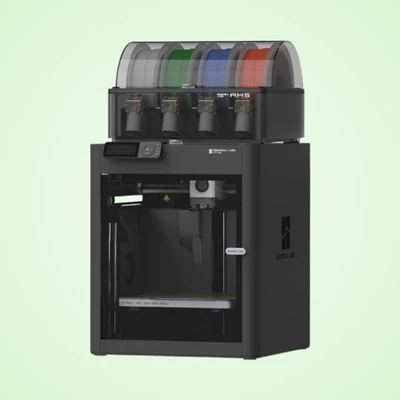
4. Bambu Lab P1S With AMS Global Version
The Bambu Lab P1S delivers professional performance in an enclosed CoreXY architecture. It is designed to be a "Plug-and-Play" solution, outperforming traditional open-frame printers in both speed and reliability.
Features & Specifications
|
Feature |
Details |
|
Build Volume |
256 x 256 x 256 mm |
|
Motion System |
CoreXY (High Speed) |
|
Filament System |
AMS (Multi-color support) |
|
Enclosure |
Fully Enclosed |
|
Connectivity |
Wi-Fi & Bluetooth |
Description:
The P1S is built for those who want professional results without manual tuning. It comes factory-calibrated and includes an enclosure, which is essential for successfully printing materials like ABS. The integrated AMS system allows for multi-color workflows, and the printer can be fully managed via the Bambu Studio PC software or the handy mobile app.
Price: Approx. ৳1,48,000.
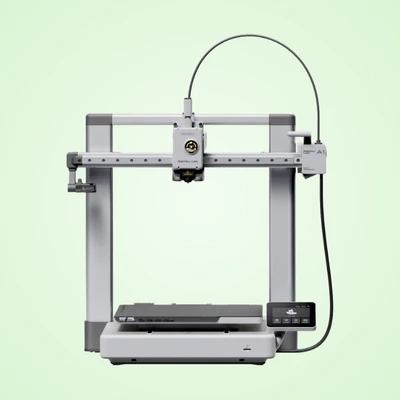
5. Bambu Lab A1 (Global Version)
The Bambu Lab A1 is a high-performance desktop printer featuring a unique CoreXZ motion system. It brings high-speed printing and advanced automation to a more accessible and compact form factor.
Features & Specifications
|
Feature |
Details |
|
Build Volume |
256 × 256 × 256 mm |
|
Max Motion Speed |
500 mm/s |
|
Heated Bed |
Up to 100 °C |
|
Calibration |
Auto Bed Leveling & Flow Compensation |
|
User Interface |
Intuitive Touchscreen |
Detailed Description:
The A1 is ideal for educators and small businesses. It features a low-noise design and a suite of sensors to detect filament run-out or tangles. Despite its open design, it offers the same 500mm/s speed as the higher-end models. Its automated calibration (including pressure advance) ensures a perfect first layer every time, significantly reducing failed prints.
Price: Approx. ৳49,800 - ৳58,000.
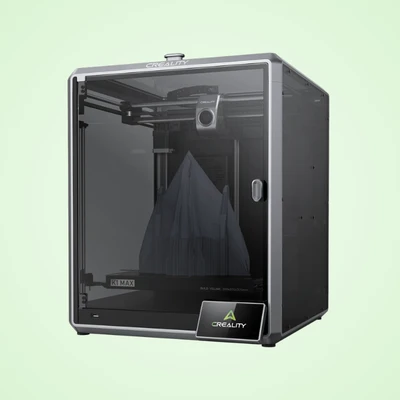
6. Creality K1 Max AI Fast 3D Printer
The Creality K1 Max is a powerhouse of speed and intelligence. With a large build volume and AI-driven features like LiDAR and a built-in camera, it offers a hands-free printing experience for professionals and beginners alike.
Features & Specifications
|
Feature |
Details |
|
Build Volume |
300 x 300 x 300 mm |
|
Max Print Speed |
600 mm/s |
|
LiDAR Resolution |
1μm |
|
Rated Power |
1000 W |
|
Screen |
4.3 inch Color Touchscreen |
|
Air Purifier |
Integrated |
Description:
The K1 Max uses AI LiDAR to scan the first layer for imperfections and an AI camera to watch for "spaghetti" failures. It arrives pre-assembled and pre-calibrated. The printer's frame is a robust unibody die-cast alloy, providing the stability needed for 600mm/s speeds. It also includes an air purifier, making it safer to use in small workspaces.
Price: Approx. ৳1,55,000.
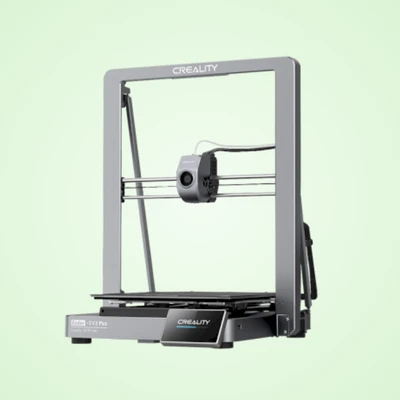
7. Creality Ender-3 V3 Plus
The Ender-3 V3 Plus is the larger sibling of the V3 series, offering a 58% larger build volume. It uses a CoreXZ motion system for high-speed operation while maintaining a desktop-friendly footprint.
Features & Specifications
|
Feature |
Details |
|
Build Volume |
300 × 300 × 330 mm |
|
Max Speed |
600 mm/s |
|
Acceleration |
20,000 mm/s² |
|
CPU |
1.2GHz Dual-Core |
|
Nozzle |
Quick-Swap Tri-Metal |
Description:
This model is perfect for printing large objects like cosplay props or prototypes in one piece. It features dual Y-axis motors to handle the extra weight of the larger bed. With the Creality OS and a 4.3" IPS touchscreen, it supports smart features like input shaping to eliminate ghosting, ensuring smooth surfaces even at blazing speeds.
Price: Approx. ৳45,000 - ৳50,000.
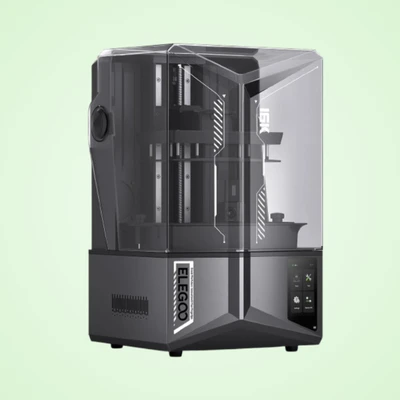
8. Elegoo Saturn 4 Ultra 16K Resin 3D Printer
The Elegoo Saturn 4 Ultra is a leader in precision resin printing. Featuring a massive 10-inch 16K monochrome LCD, it produces parts with incredible detail and a smooth surface finish that is nearly injection-mold quality.
Features & Specifications
|
Feature |
Details |
|
Display |
10-inch 16K Monochrome LCD |
|
Resolution |
14µm XY Accuracy |
|
Print Speed |
Up to 150 mm/h |
|
Build Volume |
218.88 × 122.88 × 220 mm |
|
Special Tech |
Tilting Release Film System |
Description:
The Saturn 4 Ultra redefines high-performance resin printing with its auto-leveling and smart mechanical sensors. The tilting release technology allows for faster printing and safer part separation. It also includes a built-in resin heating system to ensure consistency in varying temperatures and an AI camera for remote monitoring.
Price: Approx. ৳74,000 - ৳82,000.
3D Printer Model Comparison
|
# |
Model Name |
Technology |
Build Volume (mm) |
Max Speed |
Key Highlight |
Approx. Price (BDT) |
|
1 |
Bambu Lab H2C Laser |
FDM + Laser |
330 x 320 x 325 |
500 mm/s |
40W Laser + Dual Nozzle |
৳4,95,000 |
|
2 |
Bambu Lab X1-Carbon |
FDM |
256 x 256 x 256 |
500 mm/s |
AI LiDAR & Carbon Fiber Ready |
৳2,19,360+ |
|
3 |
Creality CR-M4 |
FDM |
450 x 450 x 470 |
120 mm/s |
Massive Large Format Printing |
৳1,82,000 |
|
4 |
Bambu Lab P1S Combo |
FDM |
256 x 256 x 256 |
500 mm/s |
Enclosed Multi-color System |
৳1,48,000 |
|
5 |
Bambu Lab A1 |
FDM |
256 x 256 x 256 |
500 mm/s |
High-Speed Desktop CoreXZ |
৳49,800 |
|
6 |
Creality K1 Max AI |
FDM |
300 x 300 x 300 |
600 mm/s |
AI Camera & Rapid Speed |
৳1,55,000 |
|
7 |
Creality Ender-3 V3 Plus |
FDM |
300 x 300 x 330 |
600 mm/s |
Large Build at Budget Price |
৳45,000 |
|
8 |
Elegoo Saturn 4 Ultra |
Resin (LCD) |
218 x 122 x 220 |
150 mm/h |
Ultra-detailed 16K Resolution |
৳74,000 |
Expert Recommendation: Best 3D Printers
The Bambu Lab X1-Carbon is widely regarded as the best all-round 3D printer for professional use. It offers exceptional speed, consistent print quality, and advanced features like AI-assisted calibration and multi-material support. For professionals who want reliability with minimal tuning, this is one of the safest choices.
For businesses needing more versatility, the Bambu Lab H2C Laser is a powerful option. It combines 3D printing with laser engraving, which makes it highly useful for production environments, product customization, and creative workflows. তবে এটি বেশি niche use-case এর জন্য উপযোগী।
If your work involves large prototypes or industrial-scale models, the Creality CR-M4 is a strong contender. Its huge build volume allows you to print bigger objects in a single run, which is very useful for engineering or architectural projects.
For ultra-detailed work like miniatures, jewelry, or precision parts, the Elegoo Saturn 4 Ultra is unmatched. Its resin technology produces extremely fine details, but it requires more careful handling compared to FDM printers.
If you consider overall performance, reliability, ease of use, and versatility, the best choice is clearly the Bambu Lab X1-Carbon.
How to Choose the Right 3D Printer
Buying a 3D printer is not just about choosing a machine it is a long-term investment. If you choose the wrong one, you may face poor print quality, wasted money, or a machine that doesn’t match your needs. Understanding a few key factors will help you make a smart decision.
1. Clearly Define Your Purpose
Before anything else, decide what you want to do with the printer. Different use cases require different types of machines. For example, students and hobby users mainly need simple models, while engineers or businesses may need high precision or industrial-grade output. Without a clear purpose, it becomes easy to buy the wrong type.
2. Choose the Right Type of Printer
Each 3D printing technology works differently and is designed for specific purposes. FDM printers are best for beginners and general use, while resin-based printers like SLA, MSLA, and DLP are better for detailed and fine work. Industrial technologies like SLS and MJF are used for strong, professional-grade production. Choosing the correct type is one of the most important decisions.
3. Understand Printing Materials
Every printer uses a different material, and this directly affects cost and quality. FDM printers use plastic filaments, resin printers use liquid resin, and SLS or MJF systems use powder materials. Material cost and availability in your region (like Bangladesh) should always be considered, because it affects long-term running expenses.
4. Print Quality and Resolution
Print quality depends on how finely the printer can build each layer. Higher resolution means smoother and more detailed results. Resin printers generally produce much higher detail than FDM printers, making them better for miniatures, jewelry, and dental models.
5. Build Volume (Printing Size)
Build volume refers to the maximum size of an object the printer can create in one go. If you plan to print large objects, prototypes, or mechanical parts, a bigger build volume is necessary. For small models or hobby work, a compact printer is usually enough.
6. Printing Speed
Speed determines how long a print takes to complete. Some printers are very fast but slightly less detailed, while others are slower but produce higher precision results. Balancing speed and quality is important depending on your workflow.
7. Budget (3D Printer Price in Bangladesh)
Price varies widely depending on technology, brand, and features. In Bangladesh, entry-level FDM printers are affordable, while resin and industrial machines can be significantly more expensive. Always decide your budget first and then compare options within that range.
8. Software and Ease of Use
Good software makes 3D printing much easier. It helps you prepare models, adjust settings, and control the printer. Beginner-friendly software is especially important if you are new to 3D printing, as complex systems can be difficult to manage.
9. Maintenance and After-Sales Support
3D printers require regular maintenance such as cleaning, calibration, and occasional part replacement. Before buying, check whether spare parts, repair services, and customer support are available in your area. This becomes very important for long-term use.
10. Brand Reputation and User Reviews
Always research the brand and read user feedback before making a purchase. Well-known brands usually provide better reliability, software support, and build quality. For example, some premium brands may cost more but offer better long-term performance and stability. A 3D printer is not just a gadget-it is a tool that can support learning, creativity, and even business. The best choice depends on your needs, budget, and long-term goals.
Essential 3D Printing Software
CAD Software (For Designing Models)
|
Software |
Cost |
Difficulty |
Best For |
|
Tinkercad |
Free |
Easy |
Absolute beginners, simple shapes |
|
Fusion 360 |
Free (students/hobbyists) |
Medium |
Engineers, product designers |
|
Blender |
Free |
Hard |
Artists, organic shapes, sculpture |
|
FreeCAD |
Free |
Medium |
Parametric modeling, open-source lovers |
|
SolidWorks |
Expensive |
Hard |
Professional engineers |
Slicer Software (For Preparing Prints)
|
Software |
Cost |
Best For |
|
Ultimaker Cura |
Free |
All FDM printers, beginners |
|
PrusaSlicer |
Free |
Advanced FDM users |
|
Bambu Studio |
Free |
Bambu Lab printers |
|
Chitubox |
Free / Premium |
Resin printers |
|
Lychee Slicer |
Free / Premium |
Resin, advanced support control |
Frequently Asked Questions (FAQ)
Q1: Where can I buy 3D printer filament in Bangladesh?
You can find PLA and ABS filaments in tech shops on Elephant Road, Dhaka. Online, Daraz and local Facebook groups like “3D Printing Bangladesh” are also popular sources.
Q2: How much electricity does a 3D printer use in Bangladesh?
An FDM printer uses about 100-200W. On average, a 10-hour print costs around ৳8-৳20, making it very affordable.
Q3: Can I import a 3D printer from AliExpress to Bangladesh?
Yes, but import duties (around 25–37%) apply. Sometimes buying locally via Daraz or importers is easier and similarly priced with warranty support.
Q4: How long does it take to learn 3D printing?
Basic printing can be learned in 1-2 days. Mastering design and troubleshooting may take a few weeks of practice.
Q5: Is 3D printing legal in Bangladesh?
Yes, it is fully legal. However, producing illegal items like weapons or counterfeit goods is not allowed.
Q6: Is PLA filament available in Bangladesh?
Yes. PLA is widely available on Daraz and local shops, usually costing ৳800-৳1,500 per kg.
Q7: Can a 3D printer work during load shedding?
No, power cuts can ruin prints. It’s best to use a UPS or IPS backup for uninterrupted printing.
Conclusion
A 3D printer is one of the most versatile tools you can own. It's part workshop, part laboratory, part art studio. Whether you want to fix broken household items, prototype a product idea, create personalized gifts, or explore a new creative medium a 3D printer gives you the power to bring ideas to life.
The technology has never been more accessible. Prices are lower, software is more intuitive, print quality has improved dramatically, and the global community of makers is larger and more helpful than ever.
For beginners: Start with an FDM printer, use PLA filament, download Tinkercad or browse Printables for models, and embrace the learning curve. Your first successful print will be unforgettable.
For professionals: The technology is now mature enough to integrate into real workflows - from rapid prototyping and custom tooling to end-use production parts and medical devices.
The question isn't whether 3D printing is worth learning. It's how soon you want to start turning your ideas into reality.