In Bangladesh Router price starts from BDT 2,800 and may go up to BDT 7,259 based on brand and features. Buy latest Router at best price from popular online shops in Bangladesh.
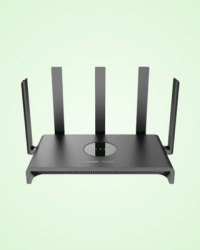
Ruijie RG-EW1300G is a Wi-Fi 5 dual-band Gigabit mesh router designed for stable
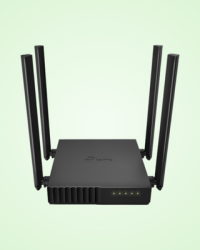
TP-Link Archer C54 AC1200 Dual Band Wi-Fi Router provides stable dual-band Wi-Fi
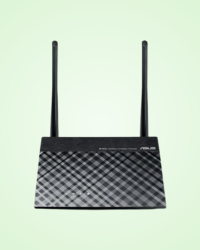
ASUS RT-N12 300Mbps WiFi Router হলো একটি নির্ভরযোগ্য
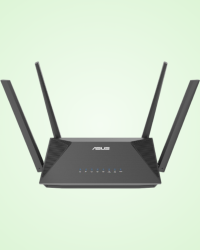
ASUS RT-AX52 AX1800 Dual Band WiFi Router হলো একটি আধুনিক
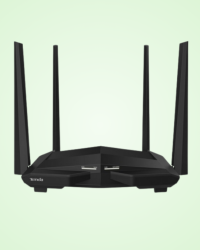
Tenda AC10 AC1200 Dual Band Gigabit WiFi Router একটি শক্তিশালী

Tenda AC15 AC1900 Dual-Band Gigabit WiFi Router একটি শক্তিশালী

TP-Link Deco S7 (3-Pack) AC1900 একটি উচ্চ-গতির ডুয়াল
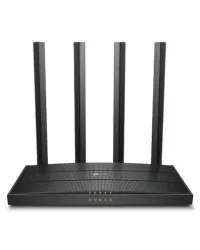
TP-Link Archer C6 AC1200 Dual-Band Gigabit Mesh Wi-Fi Router delivers fast and stable
There was a time when the internet simply meant being connected to a single computer. But times have changed. Now our homes are filled with smart devices - smartphones, laptops, smart TVs, gaming consoles, and even smart lights and fans. At the center of all these devices is a small box called the router.
No matter how fast your internet connection is, a weak router can ruin your entire experience. Frequent disconnections during video calls, buffering during online classes, or lag during an intense gaming moment all of these could be caused by an outdated or low-quality router. Think of it as the invisible traffic controller of your home network, making sure data reaches every device properly.
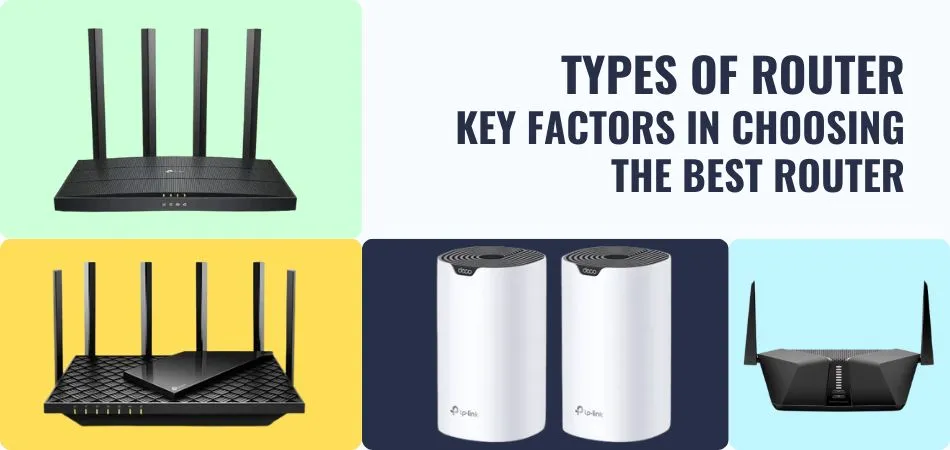
A router is a device that receives the internet connection from your Internet Service Provider (ISP) and distributes it among multiple devices in your home or office (phones, laptops, TVs, gaming consoles, etc.). In simple terms, it directs your internet data to the right devices and creates a network.
Routers create a Local Area Network (LAN) within your home or office. This network allows all your devices to connect to the internet. Most modern routers now provide Wi-Fi, allowing you to use the internet wirelessly.
When you open a YouTube video or visit a website, your device sends a request through the router to the internet. The router then receives the data from the server and sends it back to the correct device.
When you visit the market, you’ll find routers in various shapes, prices, and performance levels. If you’re buying one for the first time, it can feel overwhelming. To help you make an informed choice, here are the main types of routers you’ll come across:
1. Wireless Router
Connects devices directly through Ethernet cables. It offers stable and high-speed connectivity but requires each device to be wired. Commonly used in offices or server setups.
2. Wired Router
Operates only on one frequency band (usually 2.4 GHz). It’s affordable but can face interference from other devices like microwaves or Bluetooth. Suitable for basic browsing and light streaming.
3. Single-Band Router
Operates only on one frequency band (usually 2.4 GHz). It’s affordable but can face interference from other devices like microwaves or Bluetooth. Suitable for basic browsing and light streaming.
4. Dual-Band Router
Works on two frequency bands - 2.4 GHz and 5 GHz. The 2.4 GHz band handles normal tasks, while the 5 GHz band delivers higher speeds. Great for gaming and HD streaming.
5. Tri-Band Router
Includes one 2.4 GHz band and two 5 GHz bands. Ideal for large families, offices, or heavy users since it helps balance the load when many devices are connected.
6. Gaming Router
Specially designed for gamers. Offers high-speed internet, low latency (ping), and advanced traffic management (QoS) for smoother online gaming.
7. Mesh Router
Perfect for large homes or offices. It uses multiple nodes to create seamless Wi-Fi coverage across the entire area, eliminating “dead zones.”
8. VPN Router
Comes with built-in VPN support, offering encrypted internet connections for all connected devices - ideal for privacy-conscious users.
9. Pocket Router (MiFi Router)
Compact, portable, and easy to use. Works with a mobile SIM (3G/4G/5G) to create a Wi-Fi hotspot. Battery-powered, making it ideal for travel.
10. SIM-Supported Router
Uses a mobile SIM card for internet access. Perfect for areas without broadband service, commonly used in rural areas, offices, or while traveling.
Not all routers are created equal. Home routers focus on simplicity, affordability, and wireless coverage, while enterprise routers are designed for performance, scalability, and management of vast amounts of data. Popular home router brands include TP-Link, Netgear, and Asus, while enterprise-grade routers are often provided by Cisco, Juniper, and MikroTik.
Enterprise routers offer advanced features like multi-layer security, high-speed fiber connectivity, and sophisticated routing algorithms that home routers generally lack.
Buying a router might seem simple, but it’s one of the most important decisions for ensuring a smooth and reliable internet experience. Whether it’s for work, online classes, streaming, or gaming, the right router can make a huge difference. Below are the key factors you should consider before purchasing your next router.
Before you even compare models, start by understanding your own internet needs.
Understanding your usage helps you pick a router that meets your real needs - not just what’s trendy or expensive.
Your router must be capable of handling the internet speed provided by your Internet Service Provider (ISP).
For example, if your broadband plan offers 200 Mbps, choose a router that supports at least 300 Mbps or higher. This ensures your connection won’t be limited by your router and allows room for future upgrades.
Also, check for bandwidth efficiency - features like MU-MIMO (Multi-User, Multiple Input Multiple Output) help distribute bandwidth evenly when multiple devices are connected.
The Wi-Fi standard defines how fast and stable your wireless connection will be.
Here’s a quick breakdown:
|
Wi-Fi Standard |
Technical Name |
Features |
|
Wi-Fi 4 |
802.11n |
Basic standard; good for light use |
|
Wi-Fi 5 |
802.11ac |
Fast and stable; ideal for most homes |
|
Wi-Fi 6 |
802.11ax |
Latest technology; faster, more secure, and better for multiple devices |
If possible, go for Wi-Fi 6, as it provides future-proof performance and handles congestion far better in busy households.
Routers usually operate on one or more frequency bands:
For most homes, a dual-band router offers the best balance between speed and coverage.
Coverage is just as important as speed.
In the modern digital world, security can’t be overlooked. A router is your first line of defense against cyber threats.
Make sure your router offers:
A secure router ensures that your personal data and connected devices remain safe at all times.
Routers come in a wide price range - from affordable entry-level models to advanced gaming routers costing several times more.
Before making a final decision, spend some time reading real customer reviews.
Reviews and reliability matter just as much as specs - they reflect real-world performance.
Technology evolves quickly. Choose a router that won’t become outdated soon.
Some features worth having include:
These added features can make your internet experience smoother and more convenient.
Networking technology is constantly evolving, and routers are at the heart of many cutting-edge innovations:
Even the most advanced routers can experience problems. Understanding common issues and how to fix them can save time and frustration:
Simple steps like restarting the router, checking configurations, and keeping firmware up to date can prevent many of these common problems and maintain smooth, stable network performance.
Routers may seem like simple boxes tucked away in a corner, but they play a vital role in keeping our digital lives connected and running smoothly. Choosing the right router is about more than just speed, it’s about coverage, reliability, security, and future-proofing your home or office network.
By understanding the different types of routers, evaluating your internet needs, and keeping an eye on emerging technologies like Wi-Fi 6, mesh networks, and IoT optimization, you can ensure that your network performs at its best. A good router not only enhances your daily online activities from video calls to gaming but also safeguards your devices and data.
Invest wisely, configure it properly, and maintain it regularly and your router will keep your digital world running seamlessly for years to come.