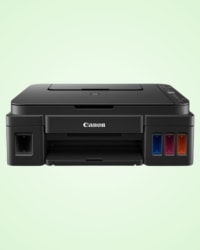
Canon Pixma G3010 হলো একটি স্টাইলিশ ও কার্যকরী
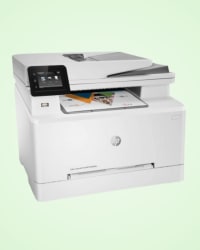
HP Color LaserJet Pro M479dw একটি শক্তিশালী অল-ইন-ওয়ান
A printer is one of the most essential devices for both personal and professional use. It allows users to convert digital documents, images, and designs into physical copies on paper or other materials. From printing school assignments and office reports to producing marketing materials and receipts, printers play a vital role in everyday productivity.
In recent years, the demand for printers has increased significantly in Bangladesh due to the rapid growth of digital work environments, online education, freelancing, and small businesses. Homes, offices, educational institutions, and commercial organizations rely on printers to manage documents efficiently and maintain smooth workflow.
Modern printers come with advanced technologies such as wireless connectivity, mobile printing, cloud integration, and high-resolution printing capabilities. Whether you need a printer for basic home use or professional printing tasks, there are many options available to meet different needs and budgets.
A printer is an output device that produces a physical copy of digital content stored on a computer, smartphone, or other electronic devices. It works by transferring text, images, or graphics onto paper using ink, toner, or other printing technologies.
Printers are widely used for a variety of tasks including:
The development of printing technology has made modern printers faster, more efficient, and more cost-effective. Many printers today support wireless connections and mobile applications, allowing users to print directly from smartphones or tablets without needing a cable connection.
There are several types of printers designed for different purposes and printing environments. Understanding these types can help users choose the most suitable printer based on their needs.
Laser printers are widely used in offices and businesses because they offer fast printing speed and high efficiency. Instead of using liquid ink, laser printers use toner powder and a laser beam to produce sharp text and graphics.
Laser printers are ideal for printing large volumes of documents quickly and with consistent quality. They usually have a lower cost per page compared to inkjet printers, making them suitable for frequent printing tasks.
Inkjet printers are one of the most popular types of printers for home users. These printers spray tiny droplets of liquid ink onto paper to create images and text. Inkjet printers are known for producing high-quality color prints and detailed images, making them ideal for photo printing and creative work.
Although inkjet printers are generally affordable, the cost of ink cartridges may increase over time for frequent printing.
Ink tank printers are an advanced version of inkjet printers. Instead of traditional cartridges, these printers use refillable ink tanks that hold a larger amount of ink. Ink tank printers are designed for users who need high-volume printing at a lower cost per page. They are widely used in schools, small businesses, and home offices. Many modern ink tank printers are produced by well-known brands such as Epson and Canon.
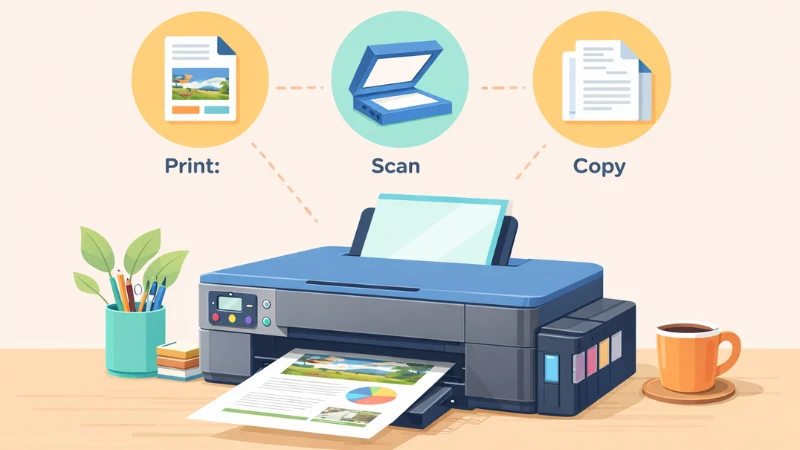
An all-in-one printer combines multiple functions into a single device. In addition to printing, these devices can scan, copy, and sometimes fax documents. All-in-one printers are very convenient because they save space and reduce the need for multiple devices. They are commonly used in homes, small offices, and educational institutions. This type of printer is ideal for users who need versatile functionality.
Dot-matrix printers are impact printers that use a print head containing multiple pins to strike an ink ribbon against paper. This method creates characters and images made of small dots. Although dot-matrix printers are considered older technology, they are still used in certain industries where continuous paper printing is required. These printers are known for their durability and ability to print on multi-part forms.
Portable mini printers are compact devices designed for mobility and convenience. These printers are small enough to carry in a bag and are often used with smartphones or tablets. Portable printers are useful for travelers, students, and professionals who need quick printing while on the move. Many portable printers support wireless printing through Bluetooth or WiFi.
3D printers are advanced devices that create three-dimensional objects from digital designs. Instead of printing on paper, 3D printers build objects layer by layer using materials such as plastic, resin, or metal. These printers are widely used in engineering, manufacturing, architecture, and educational institutions. 3D printing technology continues to grow rapidly around the world.
A3 printers are designed to print larger paper sizes compared to standard printers. These printers can handle A3-sized documents, which are commonly used for posters, architectural drawings, and marketing materials. They provide greater flexibility for large-format document printing.
Label printers are specialized devices designed to print labels, barcodes, and shipping tags. These printers are widely used in retail stores, warehouses, and logistics companies. Label printers help businesses manage inventory and product identification efficiently.
POS printers are used in retail environments to print receipts for customers. These printers are commonly connected to billing systems and point-of-sale terminals. POS printers are designed for fast and reliable receipt printing.
Large format printers are designed to produce oversized prints such as banners, posters, blueprints, and advertising materials. These printers are commonly used by printing companies, advertising agencies, and graphic design studios. Large format printing is essential for marketing campaigns, exhibitions, and promotional events.
Modern printers are no longer just basic devices for putting ink on paper—they now come packed with features that enhance convenience, efficiency, and overall user experience.
Most modern printers support Wi-Fi, enabling users to print documents without dealing with messy cables. This makes printing from multiple devices seamless and clutter-free.
With dedicated mobile apps, users can print directly from smartphones and tablets. This feature is especially useful for people who work on the go or need quick printing from mobile devices.
Duplex printing allows the printer to automatically print on both sides of a sheet. This saves paper, reduces costs, and is eco-friendly, making it ideal for busy offices and home users alike.
Modern printers offer high-resolution printing, ensuring crisp text and vivid, sharp images. This is essential for professional documents, graphics, and photo printing.
Measured in pages per minute (PPM), faster printers save time, especially in offices or businesses with high-volume printing needs. Quick output means less waiting and higher productivity.
Printers are versatile tools used across homes, offices, and institutions.
Families use printers for school projects, personal documents, photos, and creative projects, making everyday tasks easier.
In offices, printers handle reports, presentations, and administrative paperwork, ensuring smooth workflow and professional output.
Businesses rely on printers for invoices, receipts, labels, and marketing materials, supporting both operational and promotional needs.
Schools, colleges, and universities use printers to produce study materials, research papers, exam documents, and educational resources efficiently.
When it comes to buying a printer for your home, office, or business, understanding the key features is essential to make the right choice. Printers today come with a wide range of functionalities, and knowing what matters most will help you invest in a device that suits your needs perfectly.
The brand of a printer can influence its reliability, durability, and overall performance. In Bangladesh, popular brands include HP, Canon, Epson, Brother, and Pantum. HP and Canon are widely used for personal and office tasks due to their consistent print quality, while Epson is favored for high-quality photo printing. Brother and Pantum provide cost-effective solutions for businesses that need bulk printing without compromising efficiency. Choosing a reputable brand ensures better customer support and longer-lasting performance.
Printers come in various types, such as inkjet, laser, and dot matrix. Inkjet printers are ideal for colorful documents, photos, and graphics, making them suitable for students, designers, and creative professionals. Laser printers are known for their speed and efficiency, particularly for black-and-white printing, making them a staple in office environments. Dot matrix printers, though less common, are still used in businesses for printing receipts and invoices. Selecting the right type depends on your printing volume, document types, and budget.
While some printers are dedicated to printing alone, many modern models offer additional functions like scanning, copying, and faxing. Multifunction printers are particularly useful for home offices or businesses where space and convenience are priorities. These all-in-one devices save time, reduce clutter, and often include mobile printing features, allowing users to print directly from smartphones and tablets.
Printers are available in monochrome and color models. Monochrome printers are sufficient for text-heavy documents and offer faster, cost-effective printing. Color printers, on the other hand, deliver high-quality, vibrant prints suitable for images, presentations, brochures, and professional materials. High-end color printers can produce professional-grade output, making them a preferred choice for creative professionals and businesses.
The speed at which a printer produces pages varies according to model and technology. Black-and-white printing can range from 10 to over 50 pages per minute, with laser printers typically outperforming inkjets. Color printing is generally slower, often between 5 to 30 pages per minute, depending on whether the printer is inkjet or laser. Fast printing speeds are especially important in offices or business settings with high-volume needs.
Some printers come with duplex printing capabilities, allowing automatic double-sided printing. This feature not only saves paper but also makes documents look more professional. While some models require manual duplexing, many modern printers handle it automatically, which is particularly useful for offices aiming to reduce waste and improve efficiency.
Printers support a variety of paper sizes, including A4, A3, Letter, and Legal. Most home and office printers handle A4 documents, but businesses that print posters, marketing materials, or blueprints may require A3-capable printers. Some models even support custom sizes, which is ideal for printing envelopes, labels, or banners.
Modern printers offer multiple connectivity options for flexibility and ease of use. Standard USB connections allow direct wired printing, while Wi-Fi enables wireless printing from multiple devices. Ethernet is ideal for network-based office setups, and Bluetooth allows easy mobile or tablet printing. A printer with multiple connectivity options can adapt to different work environments seamlessly.
Understanding a printer’s monthly print capacity is important, especially for heavy users. Home printers are typically designed to handle around 1,000 pages per month, which is sufficient for students or personal use. Office and business printers, however, can handle anywhere from tens of thousands up to 100,000 pages monthly, catering to high-volume environments.
Printers use different consumables depending on the type. Inkjet printers rely on ink cartridges for both black and color printing, offering excellent quality but sometimes higher running costs. Laser printers use toner cartridges, which last longer and are more cost-effective for high-volume printing. Dot matrix printers use ribbons, primarily for receipts and impact printing. Some modern printers feature continuous ink supply systems (CISS) or tank-based refills, reducing cost per page and making them ideal for heavy users.
Printers are available in various colors and finishes, from classic black to modern white and gray, allowing you to choose a design that matches your workspace or home decor. Some high-end models even focus on aesthetics, blending seamlessly into stylish office setups.
By keeping these factors in mind-brand, type, functions, print quality, speed, duplexing, paper size, connectivity, monthly capacity, consumables, and design-you can choose a printer that not only meets your needs but also provides long-term reliability and efficiency.
In Bangladesh, several printer brands have become popular due to their reliability, print quality, and after-sales support. HP and Canon are widely recognized for personal and office use, offering consistent performance and high-quality prints. Epson is favored for its superior photo printing capabilities, making it a top choice for designers and creative professionals. Brother and Pantum provide cost-effective options for businesses that require bulk printing without compromising efficiency. These brands dominate the market by combining durability, advanced features, and accessible service centers across the country.
Printers remain an essential part of modern homes, offices, and businesses. With many different types available, users can choose a printer that matches their specific printing needs and budget.
Whether you require a basic printer for home use or a high-performance device for professional printing tasks, selecting the right printer can improve productivity and simplify document management.
By understanding printer types, features, and buying considerations, users in Bangladesh can make an informed decision and enjoy reliable printing performance for years to come.